
- HOME
- Column・Blog
- Overseas Internet
- South Korea SIM Card Guide (2026): How to Buy, Set Up & Compare to eSIM
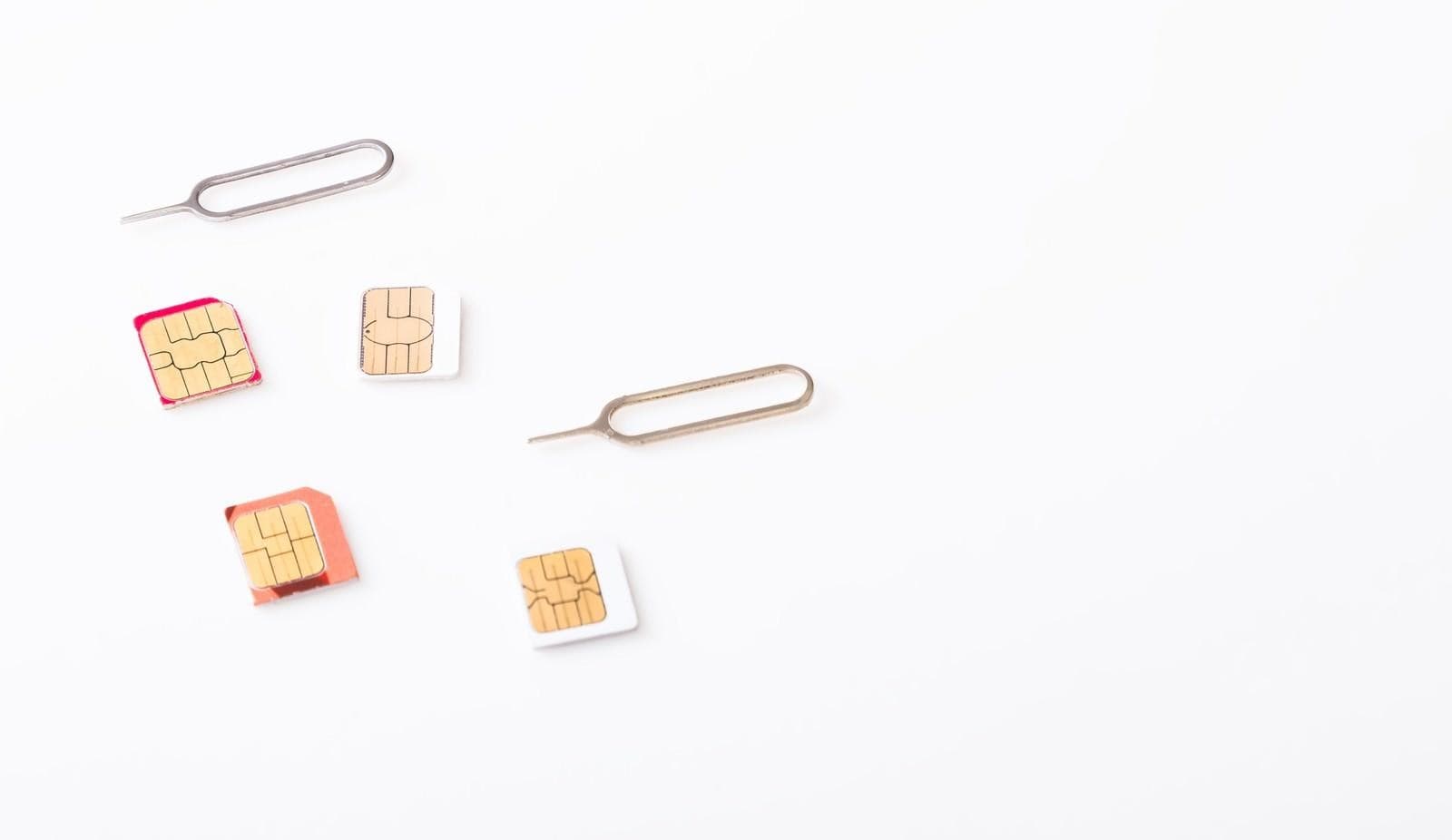
South Korea SIM Card Guide (2026): How to Buy, Set Up & Compare to eSIM
Get trifa and enjoy internet connectivity wherever you go
Only 3 minutes for setup!Get trifa App for FREE!

CHAT BOT
Ask for inquiries about use
For most travelers heading to South Korea, the two real connectivity options are a physical prepaid SIM card from a Korean carrier — SK Telecom, KT, or LG U+ — and a travel eSIM that activates entirely online. Both run on the same world-class 5G networks (median 5G download speeds top 400 Mbps in nationwide tests) and both cost less than international roaming. This guide walks through the full Korea SIM card decision: how prepaid SIMs work, where to buy them (Incheon, Gimpo, Gimhae airports, online through Klook or KKday, or in-country at CU and GS25 convenience stores), what they actually cost in USD, AUD, and GBP, and exactly how to set one up step by step. We'll also compare them head-to-head with eSIM so you can pick the right option for your phone, trip length, and budget. Last updated: 2026-06-15
Table of Contents
5 Ways to Get Mobile Data in South Korea
South Korea has world-class mobile infrastructure, but the moment you step off the plane at Incheon, you still have to pick the actual pipe your phone will use. Five practical options cover almost every traveler.
- A Korean prepaid physical SIM card from SK Telecom, KT, or LG U+
- A travel eSIM from a global provider such as Airalo, Holafly, Saily, or Trifa
- A rented Pocket WiFi (portable hotspot)
- International roaming from your home carrier (Verizon, T-Mobile, EE, Vodafone, Telstra, Optus, etc.)
- South Korea's free public Wi-Fi network
Each option has a clear sweet spot. The rest of this guide focuses on the physical SIM card route and where it still beats — or loses to — the alternatives.
Korean prepaid SIM card
A physical SIM card is the classic option: a tiny plastic chip you slide into your phone's SIM tray. It works on almost any unlocked phone, including older handsets and entry-level Android models that don't support eSIM. The three Korean carriers — SK Telecom, KT, and LG U+ — all sell tourist prepaid SIMs at major airports, and you can also order one online before you fly.
Make sure your phone is unlocked before you travel, and keep a SIM ejector pin (or a paperclip) handy for swapping cards.
Travel eSIM for Korea
An eSIM is a digital profile that lives inside your phone's chipset. There's no physical card to swap and nothing to lose, and you can activate the line entirely online before you board.
Most modern flagship phones — iPhone XR / XS and later, Samsung Galaxy S20 and later, Google Pixel 3a and later — support eSIM. Because the eSIM runs alongside your home SIM in dual-SIM mode, you can keep receiving calls and texts on your regular number while data flows over the Korean line.
Pocket WiFi rental
A Pocket WiFi is a small battery-powered router that broadcasts a private Wi-Fi signal for up to about five devices. Setup is plug-and-play: power it on, enter the password printed on the back, and you're online. The trade-off is one more device to carry and charge, plus a refundable deposit at pickup.
Pocket WiFi tends to be cheapest on a per-person basis for groups of three or more sharing a single unit.
International roaming
If you're on a US, UK, or Australian carrier, your existing plan probably works in Korea — for a price. Verizon TravelPass is $12 per day in Korea with up to 5 GB of high-speed data before stepping down to 3G. T-Mobile's Magenta and Go5G plans include unlimited 2G-speed data and texts in Korea with calls at $0.25 per minute; high-speed data requires an International Pass (from $5 for a 1-day pass). UK carriers price Korea as a higher-tier zone: EE Travel Data Pass is £7 per day, Vodafone's Roaming Pass is £6 to £8 per day, and Three's Go Roam Around the World Extra is £8 per day on new plans from December 2025. Australia's two majors keep it simple: Telstra and Optus both offer Korea on a $5 AUD per day Daily Roaming or International Day Pass.
Convenient if you're in Korea for a weekend, expensive past about three days.
Free public Wi-Fi
The Seoul Metropolitan Government has rolled out thousands of free Wi-Fi hotspots across the city, plus free 5G Wi-Fi on every car of every line in the Seoul Metro. Cafés (Starbucks, Twosome Place, Ediya, Hollys), and CU and GS25 convenience stores also offer free Wi-Fi.
Useful as a backup, but not enough on its own — coverage drops outside central Seoul, many networks throttle at peak hours, and some require a Korean phone number to authenticate. Treat free Wi-Fi as the layer on top of your own SIM, eSIM, or Pocket WiFi.
Why a Physical SIM Card Still Makes Sense in Korea
eSIMs get most of the attention now, but a prepaid Korean SIM card still wins in a few specific situations. The five reasons below are why physical SIMs continue to sell well at every airport counter in the country.
Lower cost than roaming or Pocket WiFi
For a one- or two-week trip, a Korean prepaid SIM is the single cheapest paid option. Pricing varies by carrier and data tier, but Korean prepaid SIMs typically range from roughly $5 to $90 USD depending on data and duration. KT, for example, sells a 10-day unlimited tourist SIM for about $24 USD. Compare that to roaming at $12 per day or a Pocket WiFi rental at $7 to $11 per day plus a deposit, and the SIM wins on raw cost.
Almost nothing extra to carry
A SIM card is about 15 mm by 12 mm and a few grams. It slides into the SIM tray you already have. Compare that to a Pocket WiFi, which adds roughly 100 g for the router plus another 200 to 400 g for the charger, cable, and pouch — and a cable you have to plug in every night. If you're traveling carry-on only or hiking around Seoul all day, the weight difference matters.
Plenty of plan choices
Korean tourist SIMs come in a wide range of plans. You can pick a small data plan for a long weekend, an unlimited plan for two weeks of remote work, or a voice-and-data plan if you need a Korean phone number for KakaoTalk verification or a domestic delivery account. Data tiers commonly run from a few hundred megabytes per day up to truly unlimited.
Online immediately on arrival
If you buy your SIM online before you fly and have it shipped or ready for airport pickup, you can be on the Korean network within minutes of landing — without queueing at a counter or waiting for free Wi-Fi to load a captive-portal page. Useful when you need to call your ride, check your hotel address, or open a translation app the moment you step out of customs.
Works on older and budget phones
Physical SIM is a mature, near-universal technology. If you're traveling with an older iPhone, an entry-level Android, or a budget phone you bought as a travel-only device, it almost certainly has a SIM tray. eSIM, by contrast, is still limited to flagship and recent mid-range models. An unlocked older phone with a physical SIM is a perfectly fine setup in Korea.
Downsides of Using a Physical SIM in Korea
Physical SIMs are not a magic bullet. There are four real downsides to know about before you commit.
Your phone must be unlocked
If your phone is locked to your home carrier (common in the US, the UK, and Australia when you buy on contract or financing), a Korean SIM card simply won't activate. You have to call your carrier and request an unlock — most will do it for free once your device is paid off or your contract is satisfied, but the process can take a few business days. Confirm your phone is unlocked at least a week before you fly.
Shipping and identity checks take time
If you order online and ship internationally, give yourself a week or more. Some plans also require identity verification (a passport scan submitted in advance). South Korea's real-name verification rules tightened in January 2026, and Korean prepaid carriers no longer accept a printed e-visa as ID — you need a physical visa sticker or an Alien Registration Card on arrival. The vast majority of short-stay tourists from visa-exempt countries are unaffected, but check the specific plan you buy.
Setup takes a few minutes
To use a Korean SIM you have to power down the phone, eject the existing tray with a pin, swap cards, power back up, and sometimes manually configure an Access Point Name (APN). It's not difficult, but it's more work than the one-tap eSIM activation flow on a modern phone. Read the SIM provider's setup instructions before you fly so you're not standing in the arrivals hall fiddling with menus.
Loss and damage risk
SIM cards are small, easy to drop, and easy to bend. If you lose your home SIM during the swap, you'll need to request a replacement from your home carrier when you get back. If you lose the SIM ejector pin, swapping back to your home SIM at the airport on the way out becomes a small adventure. Carry a dedicated SIM holder or tape the spare SIM and pin to the inside of your wallet for the duration of the trip.
How to Set Up a Korea SIM Card: Step-by-Step
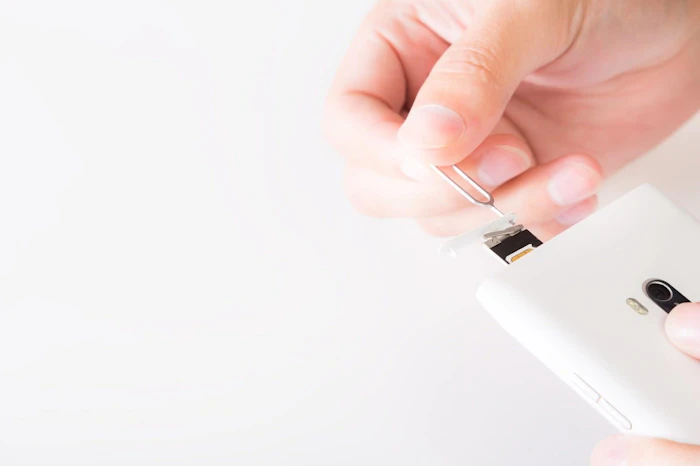
Once you have an unlocked phone and a Korean tourist SIM in hand, the setup process is short. The four steps below take most travelers under ten minutes.
1. Confirm your phone is unlocked
On an iPhone, open Settings → General → About and scroll to the "Carrier Lock" line. It should read "No SIM restrictions." On Android, open Settings → About phone → SIM card status (or Status, depending on the brand). If your phone is locked, contact your home carrier and request an unlock before you fly. Most US, UK, and Australian carriers will unlock a device for free once it's paid off.
2. Buy your Korean SIM card
You have two practical options: buy online before you fly, or buy at the airport on arrival. Online purchase through marketplaces like Klook or KKday, or directly from a Korean carrier, is usually cheaper and lets you compare plans calmly. Airport purchase is more expensive but useful if your plans changed at the last minute. The next section covers exactly where to buy in detail.
3. Insert the SIM card
Power your phone fully off. Use the included SIM ejector pin (or a straightened paperclip) to pop open the SIM tray. Remove your home SIM, store it somewhere safe, and seat the new Korean SIM in the tray the same way (the cutoff corner only fits one way). Slide the tray back in. Power the phone on.
4. Activate and verify
Most Korean carrier SIMs are recognized automatically on iPhone and most Android phones. Within a minute or two, your carrier name should appear in the status bar. If you don't see a signal, open the network settings and manually select the carrier or enter the APN from your SIM provider's instructions. Enable Data Roaming (some travel SIMs technically operate via roaming agreements and need this toggle on). Open a map or browser to confirm data is flowing.
Where to Buy a Korea SIM Card (Airports, Online, In-Country)
You have three realistic places to buy a Korean prepaid SIM. Each has trade-offs in cost, convenience, and language support.
Airport counters at ICN, GMP, and PUS
The three main international airports all host SK Telecom, KT, and LG U+ tourist SIM counters in the arrivals area.
Airport | Where | Hours |
Incheon (ICN) | Terminal 1 and Terminal 2, arrivals floor. SKT booth near Exit 13 in T1 operates 24 hours; a CU convenience store on T1's 1F also sells SIMs around the clock. | 24 hours (selected counters) |
Gimpo (GMP) | International arrivals 1F near Gate 1, all three carriers present. | 6:00 – 23:00 |
Gimhae / Busan (PUS) | International terminal 1F between Gates 2 and 3. | Staffed during international arrival hours |
Pricing at the counter is somewhat higher than online, but staff speak English and you walk out connected. Bring your passport for identity verification, and a credit card for payment.
Online before you fly (Klook, KKday, carrier sites)
Buying online is the cheapest path for most travelers. Marketplaces like Klook and KKday offer SK Telecom, KT, and LG U+ tourist plans, often discounted versus airport walk-up rates. SK Telecom's tourist line currently sells short-stay plans from about $4.59 USD up to roughly $85 USD for thirty-day unlimited tiers. KT offers a ten-day unlimited plan at approximately $24 USD (around 34,753 KRW). LG U+ offers five-day plans for about 25,000 KRW (roughly $18 USD) and seven-day plans for about 32,000 KRW (roughly $23 USD).
You can choose between two delivery options:
- International shipping to your home address before you fly — convenient but requires a week or more of lead time.
- Airport pickup voucher — buy online at the cheaper rate, then collect the physical SIM at a dedicated counter on arrival. The best of both worlds for most travelers.
In-country convenience stores and carrier shops
If you skipped the airport counter, you can still buy a SIM after you arrive. CU and GS25 convenience stores at major airports stock tourist SIMs, and SK Telecom and KT have flagship shops in Seoul (Myeongdong, Hongdae, Gangnam) and Busan. Plan to bring your passport. Pricing in city shops is typically similar to airport counters and higher than online, so this is mainly a fallback option.
Important Things to Check Before Buying a SIM in Korea
A few small mistakes can leave you with a Korean SIM that doesn't work in your phone. Run through the checks below before you spend money.
Confirm your phone supports Korean bands
South Korea uses LTE bands 1, 3, 5, 7, and 8 on the major carriers, plus 5G in the n78 / n257 ranges. Virtually every modern phone sold in the US, the UK, Canada, and Australia covers the LTE bands; budget Android models from regional brands sometimes do not. If you're traveling with an older or unusual handset, check the spec sheet on the manufacturer's site before you buy a Korean SIM. SIM unlocking is necessary but not sufficient — band compatibility matters too.
Check the SIM card size
Physical SIMs come in three sizes: standard, micro, and nano. Almost all phones from the last six years use nano, but a multi-cut tourist SIM (one card that pops out to any of the three sizes) is safer if you're unsure. Confirm before you order online or pick from the airport counter rack.
Decide whether you need a Korean phone number
If you swap to a Korean SIM, your home number stops receiving calls and SMS for the duration. Most data-only travel SIMs come without a Korean number — fine for messaging apps such as WhatsApp, iMessage, and KakaoTalk (if pre-registered), and for banking apps that authenticate by app rather than SMS. If you need a Korean number — for KakaoTalk first-time registration, online banking, or food delivery apps like Coupang Eats or Baemin — pick a plan that explicitly includes one. Expect to pay slightly more.
Keep your home SIM and SIM ejector pin safe
You'll need your home SIM back when you fly out. Carry a dedicated SIM holder, or tape the spare SIM and the ejector pin to the inside of your wallet or to the back of your passport cover. Lose either one and you'll be paying a replacement fee from your home carrier and rummaging through hotel desks for a paperclip on the way out.
Korea SIM Card vs eSIM: Which Is Better for Your Trip?
The honest answer is that for most travelers in 2026, an eSIM is the cleaner choice. But the physical SIM still wins in two specific situations.
Older or budget phones — physical SIM is the answer
If your phone is older than 2018 (iPhone X or earlier, Samsung Galaxy S8 or earlier, mid-range Android from before 2020), it almost certainly does not support eSIM. A physical SIM is your only real option. The same goes for entry-level Android devices from regional brands that ship without eSIM hardware. The Korean physical SIM ecosystem is mature and works on virtually any unlocked phone with a SIM tray.
Want zero-touch setup — go eSIM
For travelers who want to land in Korea and be online the moment the plane door opens, an eSIM is hard to beat. You buy and activate on your home Wi-Fi before you fly, the Korean line provisions automatically, and there's nothing physical to carry or swap. On iPhones running iOS 17.4 or later, the activation flow can be a single tap. No counter, no pin, no fiddling with trays.
Side-by-side comparison
Factor | Physical SIM | eSIM |
Phone requirement | Any unlocked phone with a SIM tray | Modern flagship or recent mid-range |
Setup time | 10 to 30 minutes (insert + activate) | 3 to 10 minutes (in-app or QR) |
Typical price (5 days) | $15 – $30 USD | $10 – $25 USD |
Korean phone number | Available on some plans | Rarely available |
Keeps home line active | No (home SIM out of tray) | Yes (dual-SIM) |
Loss / damage risk | Small but real | None (digital) |
Why eSIM Is the Better Choice for Most Korea Travelers
The trend is clear: every flagship phone sold in the last five years supports eSIM, and travel eSIM providers now offer Korea plans that match or undercut prepaid SIM pricing. For most travelers, four advantages stack up.
Buy and activate from anywhere
You can buy a Korea eSIM from your couch in New York, London, Sydney, or Toronto, complete activation on your home Wi-Fi, and arrive in Seoul already connected. No shipping, no airport counter, no time lost to setup after a long-haul flight.
Nothing to swap or lose
An eSIM lives on a chip already inside your phone. There's no plastic to carry, no SIM ejector pin to lose, and no risk of bending or damaging the card when you swap. Your home SIM stays in the tray and continues to receive calls and SMS through the trip.
Loss-proof by design
If you lose the phone itself, you can typically re-install the eSIM profile on a replacement device by re-scanning the QR or signing back into your eSIM provider's app. Compare that to a physical SIM, where loss means a trip to a carrier shop and a replacement fee.
Run two lines side by side
Dual-SIM mode is the eSIM's secret weapon. Your home line stays active for calls, SMS, and any banking or messaging app tied to that number. The Korean eSIM handles data. You can switch the active data line in the phone's settings in two taps. Just remember to keep data roaming on your home line turned off to avoid surprise charges.
Why Trifa Is a Smart eSIM Choice for South Korea

Reviewed by Trifa Editorial Team. Trifa is a Japan-headquartered international eSIM service designed specifically for travelers in Asia and beyond. The app supports 200 countries and regions and is downloadable from the App Store and Google Play.
Coverage and plans tailored for Korea
For South Korea specifically, Trifa offers data plans across eight capacity tiers — 1GB, 3GB, 5GB, 10GB, 20GB, 30GB, 80GB, and Unlimited — and travel durations from 3 to 60 days. For example, the 3-day, 1GB plan starts at US$1.8 per day; the 7-day, 3GB plan from US$2.0 per day; and the 31-day, 5GB plan from US$0.7 per day. For a 5-day solo trip with moderate maps and messaging use, a 3GB plan typically lands under $15 USD total.
Quick setup in minutes
Trifa uses a fully in-app eSIM activation flow. You install the app before you fly, choose your plan, and the eSIM provisioning happens in the background — typical setup takes around 3 minutes from purchase to active data. On iOS 17.4 and later, a one-tap installation flow removes the need for QR codes entirely. Supported devices include iPhone XR / XS and later (note: phones purchased in mainland China, Hong Kong, or Macau are not supported) and Samsung Galaxy S20 and later, Pixel 3a and later, and other modern Android handsets.
Round-the-clock in-app support
If something goes wrong on the road, Trifa's in-app chat support team is available 24 hours a day, 365 days a year. The team is staffed by Japanese-speaking agents, so English-only travelers may want to use translation tools when reaching out, but response time is fast and the team can usually push a fix or reissue an eSIM within minutes.
Extra peace of mind
- "Trust Cancel" cancellation guarantee: Cancel a plan for any reason before the eSIM is activated and receive a 100% refund (a small protection fee applies). Useful if your travel plans shift at the last minute.
- Family accounts: A single account holder can manage and top up eSIMs for up to 7 family members from one dashboard.
- Travel insurance add-on: Optional same-app insurance from Tokio Marine & Nichido for trips of 1 day to 3 months.
For solo travelers and small groups visiting South Korea, Trifa delivers the simplicity of a modern eSIM with plan tiers fine enough to match a long weekend or a month-long stay. Sign-up takes seconds with LINE, Google, Apple, or email.
Frequently Asked Questions
Can I use my US, UK, or Australian SIM in Korea?
Yes, if your home carrier has a roaming agreement with a Korean network — and almost all major carriers do. The catch is cost. Verizon TravelPass charges $12 per day, EE's Travel Data Pass is £7 per day, and Telstra and Optus each charge about $5 AUD per day. T-Mobile's Magenta and Go5G plans include free unlimited 2G-speed roaming, but high-speed data requires a separate International Pass. For trips longer than two or three days, an eSIM or local SIM is usually significantly cheaper.
Is eSIM cheaper than a physical SIM in Korea?
It depends on the plan. Travel eSIM providers like Airalo, Holafly, Saily, and Trifa price Korea plans in the same range as physical prepaid SIMs — often $10 to $25 USD for five to seven days of moderate data. Pure data eSIMs without a Korean phone number tend to be a few dollars cheaper than equivalent physical SIMs, and eSIMs save you the cost of any shipping or airport markup.
Where can I buy a Korea SIM card at Incheon Airport?
SK Telecom, KT, and LG U+ all operate tourist SIM counters on the arrivals floor of both Terminal 1 and Terminal 2 at Incheon (ICN). SKT runs a 24-hour booth near Exit 13 in T1, and the CU convenience store on Terminal 1's 1F also sells SIMs around the clock. Bring your passport and a credit card.
Do I need a Korean phone number as a tourist?
For most short trips, no. Almost everything tourists do — Google Maps, KakaoTalk (once registered), WhatsApp, iMessage, ride-hailing apps, mobile banking via app authentication — runs over data without a Korean phone number. You'd want a Korean number only for first-time KakaoTalk registration, certain online banking flows, and Korean food delivery apps like Coupang Eats or Baemin.
Can I keep my home number while using a Korea SIM?
If you use an eSIM in dual-SIM mode, yes — your home line stays active on the physical SIM, and the Korean eSIM handles data. If you swap to a Korean physical SIM, your home number is offline until you swap back. To stay reachable on your home number while using a Korean physical SIM, use call forwarding via your home carrier or a service like Google Voice.
Do I still need K-ETA in 2026?
K-ETA (Korea Electronic Travel Authorization) is currently waived through December 31, 2026 for passport holders from 22 countries, including the US, Canada, the UK, Australia, New Zealand, Germany, France, and Japan. You still need to submit a Korean e-Arrival Card online within three days before your arrival, regardless of K-ETA status. Always confirm the latest entry rules on the Korean government's official immigration portal before you fly.
.jpeg&w=3840&q=75)
Get trifa and enjoy internet connectivity wherever you go
Only 3 minutes for setup!Get trifa App for FREE!
CHAT BOT
Ask for inquiries about use


Writer
trifa Editorial Team (Overseas eSIM & Connectivity)
To help reduce connectivity issues during overseas travel, we share easy-to-understand guidance on choosing and setting up overseas eSIMs (iPhone/Android), switching networks while traveling across multiple countries, and whether tethering/hotspot is supported—based on insights gained while providing the eSIM app “trifa” (including common setup stumbling points and support inquiry trends). For information that changes frequently—such as pricing, supported countries, and usage conditions—we check the latest updates on official websites and from operators, and we revise articles when changes occur.
Search by Category
Popular Articles
POPULAR ARTICLES
01
 Overseas Internet
eSIM is recommended for international travel! Here are 7 advantages in a nutshell.
2024.01.07
02
%2520(1).jpg&w=3840&q=75) Overseas Internet
Overseas InternetWhat are the 6 ways to use a Japanese smartphone/cell phone overseas?
2024.02.06
03
%2520(1).jpg&w=3840&q=75) Overseas Travel Essentials
Overseas Travel EssentialsAre you ready for a trip to Korea? Checklist of things to bring and essentials
2024.02.07
Related Articles
RELATED ARTICLES
 Overseas Internet
Pocket WiFi vs eSIM vs SIM in South Korea (2026): Which Is Best for Travelers?
2025.08.27
 Overseas Internet
Where to Buy a SIM Card in South Korea (2026): Airport, Stores & Online Guide
2025.06.28
 Overseas eSIM
How to Set Up an eSIM in South Korea (2026): Step-by-Step Guide for Travelers
2025.06.28
Get trifa and enjoy internet connectivity wherever you go
Only 3 minutes for setup!Get trifa App for FREE!
CHAT BOT
Ask for inquiries about use