
- HOME
- Column・Blog
- Overseas Internet
- Pocket Wi-Fi in Thailand (2026): Rental Costs & When an eSIM Is Better

Pocket Wi-Fi in Thailand (2026): Rental Costs & When an eSIM Is Better
Get trifa and enjoy internet connectivity wherever you go
Only 3 minutes for setup!Get trifa App for FREE!

CHAT BOT
Ask for inquiries about use
Renting a pocket Wi-Fi router in Thailand is cheap — roughly 150 to 250 baht a day, about $4.50 to $7.50 — but the rental fee is not the number that decides it. Providers also hold a refundable deposit of 1,000 to 2,000 baht, or $30 to $60, on your card until the device comes back. On a three-day trip, that frozen money is two to four times the rental fee itself. That makes the real question narrower than it looks. A rental earns its place when three or more people, or a phone plus a laptop, tablet or camera, need to share one connection, or when a phone in your party cannot take an eSIM. For a solo traveler or a couple with eSIM-capable phones, a travel eSIM at around $7 for 5 GB over a week costs less, installs before you fly, and leaves nothing to return. This guide gives you the numbers behind that call: published rates and deposits from five Thailand-based rental companies, where you collect and return a device at Suvarnabhumi, Don Mueang and Phuket, how far Thailand's free Wi-Fi actually gets you, and how pocket Wi-Fi, eSIM, a local SIM and home-carrier roaming compare over a seven-day trip.
Table of Contents
Should You Rent Pocket Wi-Fi in Thailand? The Short Answer
Renting a pocket Wi-Fi router in Thailand is worth it in one specific situation: when several people or several devices need to share one connection, and at least one of those devices cannot take an eSIM. Outside that situation, a travel eSIM or a local prepaid SIM is cheaper, faster to set up, and leaves nothing to return.
The reason is not the rental price, which is genuinely low in Thailand. It is everything attached to the rental price. Local rental companies charge roughly 150 to 250 baht a day (about $4.50 to $7.50) for an unlimited device, but they also hold a refundable deposit of 1,000 to 2,000 baht, or $30 to $60, on your card until the router comes back. On a three-day trip, the money frozen on your card is two to four times the rental fee itself. [Source: MUAYTHAI WiFi official, SmileWiFi official, Thai Smile Connect official, ThaiSims official, accessed 2026-08]
Use this table to place yourself:
Your situation | What to do | Why |
|---|---|---|
Solo or a couple, phones support eSIM | Skip the rental. Install a travel eSIM before you fly | About $7 covers 5 GB for a week, with no deposit, no counter and no return |
Family or group of three or more sharing one connection | Rent a pocket Wi-Fi | One device covers 5 to 8 connections; the per-person cost drops below a per-phone eSIM |
You travel with a laptop, tablet, camera or drone that needs data | Rent a pocket Wi-Fi, or check whether your eSIM plan allows tethering | Not every eSIM plan permits hotspot sharing, and non-phone devices rarely take an eSIM |
Your phone is older, carrier-locked, or has no eSIM slot | Rent a pocket Wi-Fi, or buy a local SIM at the airport | A router bypasses the handset entirely; nothing has to be unlocked |
You want a Thai phone number for bookings and deliveries | Buy a local prepaid tourist SIM | Rentals and travel eSIMs are data-only; neither gives you a number |
You are in Thailand for one or two days only | Consider your home carrier's day pass | At $12 a day it is poor value for a week, but fine for 48 hours with zero setup |
The rest of this guide gives you the numbers behind those calls: what rentals actually cost including deposits, where you collect and return the device, how far the free Wi-Fi really gets you, and how the four options compare over a typical week.
What to Expect from Mobile Internet in Thailand
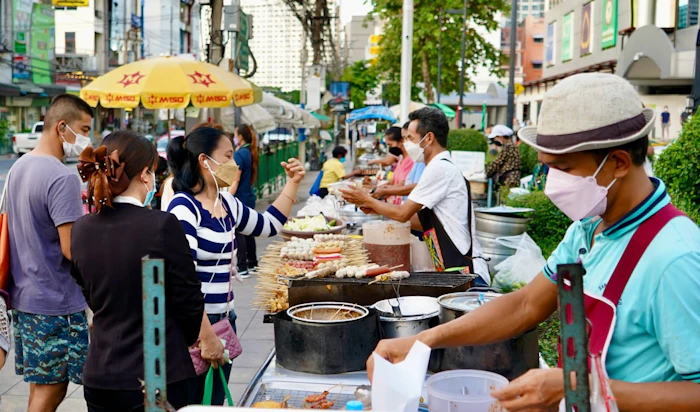
Before deciding how to get online, it helps to know what you are connecting to. Whatever you buy or rent in Thailand — a router, a travel eSIM, a local SIM — ends up riding on the same small set of networks.
Two operators carry almost all traveler traffic
Thailand's mobile market consolidated in 2023. dtac and True completed their amalgamation on 1 March 2023 under the new corporate name True Corporation Public Company Limited, which reduced the country from four national mobile brands to a two-operator structure in practice: AIS and True. [Source: True Corporation investor relations, accessed 2026-08]
The dtac name did not vanish. True still sells and services under both names — its own tourist SIM page directs buyers to "True dtac" service centers — so seeing a dtac shop or a dtac signal name on your phone does not mean you are on a separate third network. [Source: True official, accessed 2026-08]
This matters for a practical reason: when a rental company advertises which network its routers use, that tells you more than the brand of the router. SmileWiFi, for example, states plainly that its Thailand devices run on AIS. [Source: SmileWiFi official, accessed 2026-08]
Where coverage is strong, and where it thins
In Bangkok, Chiang Mai, Phuket, Pattaya and Koh Samui, 4G and 5G service in built-up areas is dense enough that most travelers never think about it. True's tourist package, for instance, is sold as unlimited internet over 5G/4G/3G at maximum available speed. [Source: True official, accessed 2026-08]
Coverage thins in predictable places rather than randomly: on boat crossings between islands, in national parks and limestone karst areas, on long-distance rural roads, and inside older concrete hotel blocks. This is the same for a rented router and for a phone SIM — a pocket Wi-Fi does not extend coverage, it only shares whatever signal it receives. If someone tells you a router "gets signal where phones do not," treat that as marketing.
The apps you rely on will work
Thailand does not run country-wide blocks on mainstream messaging and social platforms. Restrictions are applied to specific URLs and content under court order rather than to whole services, so Google Maps, WhatsApp, LINE, Instagram, YouTube and the ride-hailing apps travelers use in Bangkok behave as they do at home. [Source: Freedom House, Freedom on the Net — Thailand, accessed 2026-08]
How Pocket Wi-Fi Rental Works in Thailand — and Where to Get One
If you have only rented pocket Wi-Fi in Japan or Korea, the Thai model is different in one important way: you are usually renting from a Thai company inside Thailand, not picking up a device at your departure airport. That changes the booking timeline, the pickup logistics and the return.
Pre-order online before you fly
Every provider worth using takes reservations online, and the advertised headline prices generally assume you booked ahead. ThaiSims takes this to an extreme: its $1-a-day rate is real but conditional — you must book two months in advance, and the offer is capped at 500 devices per day on a first-come basis. [Source: ThaiSims official, accessed 2026-08] Book on arrival instead, and you pay whatever the counter charges that day.
Practical rule: reserve at least a week out, and confirm three things in writing before you pay — the pickup point, the deposit amount, and the return deadline on your departure date.
Airport counters at Suvarnabhumi, Don Mueang and Phuket
Airport collection is the most common route, and the counters are staffed around the clock, which matters given how many long-haul flights land in Bangkok between midnight and 6 a.m. SmileWiFi publishes its positions precisely:
- Suvarnabhumi (BKK) — SmileWiFi service counter on floor B, open 24 hours a day, every day
- Don Mueang (DMK) — service counter in the domestic arrival building on floor G, in front of gate 12, open 24 hours a day, every day
- Phuket (HKT) — service counter in the International Arrivals Hall on the 1st floor, in front of gate 1, open 24 hours a day, every day
[Source: SmileWiFi official, accessed 2026-08]
MUAYTHAI WiFi also offers pickup at Suvarnabhumi and Don Mueang, though it does not publish counter positions or hours, so confirm the meeting point when you book. [Source: MUAYTHAI WiFi official, accessed 2026-08]
Hotel delivery and courier pickup
If you land late, are connecting straight to a domestic flight, or simply do not want to detour through arrivals with luggage, delivery is the better option. ThaiSims will have the router waiting at your chosen hotel. [Source: ThaiSims official, accessed 2026-08] Phuket Pocket WiFi ships to a hotel or airport the night before check-in, and notes that airport pickup must be booked at least one day in advance. [Source: Phuket Pocket WiFi official, accessed 2026-08] MUAYTHAI WiFi runs a messenger service inside inner Bangkok that must be arranged a day ahead, plus service points inside department stores and parcel delivery for addresses outside Bangkok. [Source: MUAYTHAI WiFi official, accessed 2026-08]
What you need at pickup — and what you owe at return
Bring your passport and the card you booked with. The card matters more than travelers expect, because the deposit is authorized against it, and a card that fails the hold can cost you the reservation.
The return is where money is lost. Some providers want the device handed back at the same counter; others post you a prepaid EMS envelope, which you can drop at the Suvarnabhumi or Don Mueang airport post office before departure. [Source: ThaiSims official, accessed 2026-08] Both models work, but they fail differently: a counter return means budgeting time in a busy terminal, while an envelope return means you must not lose the envelope during the trip. Decide which failure you would rather risk, then book accordingly.
Setup and battery life
Setup is genuinely trivial: power on, find the SSID printed on the device or its card, enter the key. There is no app, no APN and no account.
Battery is the real constraint. MUAYTHAI WiFi rates its devices at 7 to 10 hours of continuous use; ThaiSims rates its router at up to 11 hours of continuous use and up to 300 hours of standby. [Source: MUAYTHAI WiFi official, ThaiSims official, accessed 2026-08] A full day of sightseeing in Bangkok — maps running, several phones attached, heat draining the cell — will get close to that ceiling. Both MUAYTHAI WiFi and SmileWiFi rent a power bank as an add-on at 40 to 50 baht a day (about $1.20 to $1.50), which is the cheapest insurance in this entire article. [Source: MUAYTHAI WiFi official, SmileWiFi official, accessed 2026-08]
One more constraint that does not appear on any rental page: the router has to be carried by someone. The moment your group splits up for the afternoon, only one half of it is online.
What Pocket Wi-Fi Actually Costs in Thailand
The table below collects the published rates of five Thailand-based rental providers. Every figure comes from the provider's own website, checked on 2026-08-16. USD conversions use the mid-market rate of 1 THB = $0.0302 quoted by xe.com on 2026-08-15 and are rounded; the baht figure is the one you will actually be charged.
Provider | Published daily rate | Data | Refundable deposit | Devices | Where you collect it |
|---|---|---|---|---|---|
MUAYTHAI WiFi | 4G from 150 THB (about $4.50); 100 THB (about $3) per day on rentals of 4 days or more. 5G from 200 THB (about $6) | Advertised unlimited (see note below) | 1,000 or 2,000 THB (about $30 or $60) — the site publishes both figures | 5 | BKK, DMK, Bangkok messenger, department-store service points, parcel |
SmileWiFi | 250 THB (about $7.50) regular; 150 THB (about $4.50) special rate, VAT included | 4G LTE unlimited, stated as no speed reduction and no fair-use policy, on the AIS network | Not published | Not published | 24-hour counters at BKK (floor B), DMK (floor G, gate 12), HKT (1st floor, gate 1) |
Thai Smile Connect | 175 THB (about $5.30), 3-day minimum rental | Unlimited, stated as full speed throughout | 2,000 THB (about $60), refunded via PayPal or card on return | 5 | Not published on the rental page |
ThaiSims | From $1 per day, conditional: book 2 months ahead, capped at 500 devices per day. Standard rate not published | Unlimited | $30, refunded to the original payment method | 8 | BKK pickup or hotel delivery; return by prepaid EMS envelope at the BKK or DMK airport post office |
Phuket Pocket WiFi | $4 per night; $3 per night on stays over 7 nights, 3-night minimum | Unlimited 4G | $30 | 8 | Hotel or airport delivery the night before check-in; airport pickup needs 1 day's notice |
[Source: MUAYTHAI WiFi official, SmileWiFi official, Thai Smile Connect official, ThaiSims official, Phuket Pocket WiFi official, all accessed 2026-08. Currency conversion: xe.com, 2026-08-15]
The deposit is the number most travelers miss
Compare the two columns that matter. A three-day rental at 150 baht a day costs 450 baht, roughly $13.50. The deposit held against it is 1,000 to 2,000 baht, or $30 to $60 — between two and four times the rental itself. [Source: provider official sites, accessed 2026-08. Conversion: xe.com, 2026-08-15]
That money is refundable and, on a clean return, you get all of it back. But three things are worth knowing before you agree to it. The hold sits on your card for the whole trip, reducing your available limit at exactly the point you are spending. It is released on the provider's timetable, not on the day you fly home — Thai Smile Connect, for instance, refunds via PayPal or card after the device is received. And if you damage or lose the router, the deposit is the first place the cost is recovered from.
MUAYTHAI WiFi sells an optional insurance package at 50 baht a day (about $1.50) that halves damage fines. [Source: MUAYTHAI WiFi official, accessed 2026-08] On a week's rental that is 350 baht, about $10 — worth it if you are traveling with children or moving between islands, hard to justify otherwise.
"Unlimited" does not always mean unmetered
Read the fine print, because providers do not all mean the same thing by the word. SmileWiFi states its Thailand plan is 4G LTE unlimited with no speed reduction and no fair-use policy. [Source: SmileWiFi official, accessed 2026-08]
MUAYTHAI WiFi's own site says two different things. Its price page advertises "Unlimited Data (No throttling)." Its FAQ page states that the speed is 4G LTE with a maximum download of 15 Mbps, and that when data usage reaches the package limit, speeds reduce to 256 kbps, with a daily reset at 23:59 Thailand time. [Source: MUAYTHAI WiFi official price page and FAQ page, both accessed 2026-08] We are reporting the discrepancy rather than resolving it: ask the provider directly which applies to the device you are given, and get the answer in writing before you pay.
The same site also publishes two deposit figures — 1,000 baht per device in the FAQ, 2,000 baht on the price page. Neither is necessarily wrong; rental terms differ by device and by rental type. It does mean the published number is not something to plan your card limit around.
What a week actually costs
Multi-day packages beat daily rates. MUAYTHAI WiFi's 7-day 4G unlimited package is 599 baht, about $18, against 700 baht at the 4-day-plus daily rate; its 30-day 4G package is 1,499 baht, about $45. The 5G equivalents are 899 baht (about $27) for 7 days and 1,799 baht (about $54) for 30. [Source: MUAYTHAI WiFi official, accessed 2026-08. Conversion: xe.com, 2026-08-15]
So a realistic one-week rental in Thailand lands somewhere between $18 and $37 depending on provider and device, plus the deposit held on your card. That is genuinely inexpensive — and it is still more than a week of eSIM data for one phone, which is the comparison that decides the question for most solo travelers.
Free Wi-Fi in Thailand: How Far It Really Gets You
Thailand has a lot of free Wi-Fi. It is also the single most over-relied-upon plan among travelers arriving without data, so it is worth being precise about where it works, how long it lasts, and what it cannot do.
At the airport, you get a metered window
Suvarnabhumi's own airport guide describes the free service as follows: connect to the SSID "AOT Airport Free Wi-Fi by NT", enter an email address, accept the terms, and "you can use the wireless internet immediately for 60 minutes." [Source: Suvarnabhumi Airport (AOT) official airport guide, accessed 2026-08]
There is also a higher-speed tier. Thailand's national daily The Nation reported in 2025 that selecting the SSID "AOT Sawasdee Highspeed WiFi by NT" gives you ten minutes to download the Sawasdee by AOT app, register an email, and then use up to three hours of free high-speed internet, available across six AOT airports: Suvarnabhumi, Don Mueang, Chiang Mai, Mae Fah Luang Chiang Rai, Hat Yai and Phuket. [Source: The Nation (Thailand), reported 2025, accessed 2026-08] We could not confirm the three-hour figure on an AOT-published English page, so treat 60 minutes as the number you can rely on and three hours as the better case if the higher-speed network is live at your terminal.
Either way, the arithmetic is the same: an airport Wi-Fi window is long enough to message someone that you have landed and to call a car. It is not long enough to cover an immigration queue, a baggage wait and a 45-minute drive into the city.
Malls, cafés and hotels
In Bangkok, Chiang Mai and Phuket, shopping malls, chain cafés, restaurants and hotels widely offer guest Wi-Fi, and hotel Wi-Fi in particular is usually adequate for video calls. Two caveats are worth carrying with you. First, a portion of Thailand's public hotspots are operator-run networks bundled with a local subscription rather than genuinely open networks — True's tourist SIM, for example, includes free Wi-Fi access via designated SSIDs as a package benefit, which tells you those SSIDs are not simply open to everyone. [Source: True official, accessed 2026-08] Second, some venue portals ask for a phone number and send a verification code by SMS, which is difficult if your home number is roaming-disabled and you have no Thai number.
What free Wi-Fi cannot do
The gaps are consistent and they are the expensive ones:
- Getting from A to B. Maps, ride-hailing and metered-taxi disputes all happen in motion, between hotspots
- Airport-to-hotel on arrival. This is precisely the window in which travelers most need data and least have it
- Islands and boats. Ferry piers and long-tail crossings are hotspot deserts
- Anything time-critical. Rebooking a missed connection over café Wi-Fi is a bad experience
Free Wi-Fi is a supplement to a data plan. It is not a data plan.
Security: what to avoid on an open network
Open public Wi-Fi carries no encryption between your device and the access point, and lookalike hotspots — a network named to resemble the café or hotel you are sitting in — are trivial to set up. On any open Thai network, avoid entering card details, avoid logging into banking, and avoid password resets. Save those for a connection you control: your rental router, your eSIM, or your local SIM. If you must, use a VPN, and prefer sites you reach by typing the address rather than by following a link from a captive portal.
Pocket Wi-Fi vs. eSIM vs. Local SIM vs. Roaming
Here is the whole decision on one screen. Costs are for a seven-day trip, which is the length at which the differences become obvious.
Option | Typical cost for 7 days | Devices covered | Effort before and during the trip | Best for |
|---|---|---|---|---|
Pocket Wi-Fi rental | About $18 to $37, plus $30 to $60 held as a deposit | 5 to 8 | Book ahead, collect, charge daily, return on time | Groups of 3 or more; laptops and cameras; phones without eSIM |
Travel eSIM | About $7 for 5 GB over 7 days | 1 phone; sharing depends on whether the plan permits tethering | Install before you fly; switch it on at landing | Solo travelers and couples with eSIM-capable phones |
Local prepaid SIM | 449 THB (about $13.50) for 8 days of unlimited data | 1 phone | Queue at an airport counter; register with your passport | Travelers who want a Thai phone number |
Home carrier roaming | $84 on a $12-per-day US pass; A$70 on a A$10-per-day Australian pass | 1 phone | None. Switch on and go | Trips of 1 to 2 days, or when nothing else got arranged |
[Source: rental provider official sites; Airalo official; True official; Verizon official; Telstra official — all accessed 2026-08. Conversion: xe.com, 2026-08-15]
Where the eSIM figure comes from
The $7 reference point is Airalo's Thailand package of 5 GB over 7 days, priced at $7.00; its cheapest Thailand package is 1 GB over 3 days at $4.00, and 10 GB over 7 days is $10.00. [Source: Airalo official, accessed 2026-08] Other travel eSIM brands travelers will meet in search results — Holafly, Saily, Nomad, Ubigi and Trifa — sit in broadly the same band for metered data, with unlimited plans costing several times more. Plan-by-plan eSIM pricing is a separate subject and is not the purpose of this guide; what matters here is the order of magnitude: one phone's worth of data for a week in Thailand is a single-digit dollar amount.
Where the local SIM figure comes from
True's Thailand Tourist INFINITE SIM costs 449 baht for 8 days and includes unlimited mobile internet over 5G/4G/3G at maximum available speed. It is sold at True dtac service centers nationwide with 24-hour service and at airport counters open around the clock. [Source: True official, accessed 2026-08] AIS sells comparable tourist packages; we could not render current AIS package pricing from its official English page on 2026-08-16, so no AIS figure is quoted here.
One thing to be aware of rather than surprised by: Thailand registers prepaid SIMs to the buyer's passport, and the registration rules for foreign nationals have tightened in recent years. It is a counter formality, not an obstacle, but it is the reason a local SIM takes longer to obtain than an eSIM takes to install.
Where the roaming figures come from
Verizon TravelPass costs $12 per day per device and Thailand is a TravelPass destination; only Canada and Mexico are cheaper, at $6 a day. Over a week that is $84 for one phone. [Source: Verizon official, accessed 2026-08]
Telstra's International Day Pass costs A$10 per day in Zone 2, which includes Thailand, and gives 2 GB of data per day. Over a week that is A$70. [Source: Telstra official, accessed 2026-08]
AT&T and T-Mobile in the US, EE and Vodafone in the UK, and Optus in Australia all sell comparable day passes; rates vary by destination zone and by plan, so check your own carrier's Thailand rate rather than assuming the headline price applies. The pattern holds regardless: a day pass is the most expensive way to spend a week online in Thailand, and the cheapest way to spend 48 hours.
Choose by Group Size and Trip Length
Three scenarios cover the great majority of trips.
Solo or a couple, 3 to 7 days
A travel eSIM. About $7 buys 5 GB over a week, which comfortably covers maps, messaging, ride-hailing, translation and normal social use. There is no counter to find at 1 a.m., no deposit frozen on your card, no charging cable to remember and nothing to return on the way out.
The single condition is that your phone supports eSIM and is not carrier-locked. If either is untrue, this recommendation flips: rent a router or buy a local SIM.
Couples have one extra decision. Two eSIMs cost roughly $14 for the week, still under a rental — but two eSIMs also means two independent connections, which is more robust than one router that goes home in someone's bag when the group splits for the afternoon.
Family or a group of three or more
Rent a pocket Wi-Fi. This is the case the product exists for. A 7-day rental at around $18 to $37 covers five to eight devices, so a family of four pays roughly $5 to $9 per person for the week, against about $7 per phone for individual eSIMs — and the router also covers the tablet, the laptop and the grandparent's phone that has no eSIM slot.
Two things to build into the plan. Rent the power bank; a router shared by five devices in Bangkok heat will not last a full sightseeing day. And agree who carries it, because the group's entire connectivity walks around with one person.
A week or longer, and repeat visitors
Either a local prepaid SIM or a longer eSIM plan. True's 8-day unlimited tourist SIM at 449 baht (about $13.50) is hard to beat on cost per day if you are happy to queue at an airport counter and register with your passport — and it is the only one of the four options that gives you a Thai phone number, which matters if you are making restaurant reservations, arranging deliveries, or dealing with domestic airlines. [Source: True official, accessed 2026-08]
If you would rather not swap out your home SIM, a longer-duration eSIM does the same job without touching the tray. Repeat visitors tend to converge on this: install before departure, land, switch on, done.
Why Trifa Is a Practical eSIM Alternative for Thailand
If the decision above pointed you away from a rental, Trifa is one of the eSIM apps worth looking at for a Thailand trip — particularly if Thailand is one stop on a longer route through Asia.
Coverage across 200 countries and regions means the same app covers Bangkok, then Vietnam, then Japan, without a new purchase flow each time. Plans run from 1 to 60 days across eight data tiers, from 1 GB up to unlimited, so a 4-day city break and a 6-week trip are both served without buying a bundle sized for someone else's itinerary. [Source: Trifa official, accessed 2026-08]
Setup is quick enough to do at the gate. Trifa states that a traveler can go from purchase to a working connection in as little as three minutes. On iOS 17.4 and later the eSIM installs with a single tap inside the app; on Android it installs by QR code or manual entry. Supported devices include iPhone XR and XS and later — excluding handsets bought in mainland China, Hong Kong or Macau — plus Galaxy S20 and later, Pixel 3a and later, Xperia 10 IV and later and AQUOS sense4 lite and later. [Source: Trifa official, accessed 2026-08]
Family accounts let one account holder add up to seven family members and buy and top up on their behalf, with no payment details needed from anyone else — a genuine alternative to a shared router for families in which each traveler carries an eSIM-capable phone. [Source: Trifa press release, accessed 2026-08]
An optional cancellation guarantee refunds 100% of the plan price, excluding the guarantee fee, if you cancel before the line is activated. Plans are prepaid, so there is no subscription to cancel after the trip. [Source: Trifa official, accessed 2026-08]
Three limits are worth stating plainly, because they decide whether Trifa fits your trip. Plans are data-only — no phone number, no voice calls, no SMS — so if you specifically need a Thai number, a local prepaid SIM remains the answer. Whether tethering is permitted depends on the individual plan, and it can be checked in the app before you buy; do not assume every plan can act as a hotspot for a group. And one plan installs on one device, so a second phone or a tablet needs its own plan, or has to connect by tethering where the plan allows it. [Source: Trifa official help center, accessed 2026-08]
On support: Trifa's in-app chat runs 24 hours a day, 365 days a year, and the team is staffed by Japanese-speaking agents. English-only travelers may want to use a translation tool when reaching out, but the channel is genuinely staffed around the clock, which is what matters when a connection fails at 2 a.m. in Bangkok. [Source: Trifa official, accessed 2026-08] The iOS app is rated 4.5 out of 5 from around 16,000 ratings on the Japan App Store — a Japanese-market figure, and labelled as such so you can weigh it accordingly. [Source: Apple App Store (Japan), accessed 2026-08]
Prices vary by country, duration and data tier, and change with exchange rates and local carrier terms, so check current Thailand plans in the app rather than relying on a figure quoted in an article. You can see the service at trifa.co.
Frequently Asked Questions
Is pocket Wi-Fi worth it in Thailand?
It is worth it when three or more people, or a phone plus a laptop or tablet, need to share one connection — or when a phone in your party cannot take an eSIM. A week's rental runs roughly $18 to $37 and covers 5 to 8 devices, so for a family of four it works out cheaper per person than individual eSIMs. For a solo traveler or a couple with eSIM-capable phones, it is not worth it: about $7 buys 5 GB of eSIM data for a week, with no deposit, no counter and nothing to return. [Source: rental provider official sites and Airalo official, accessed 2026-08]
Is there pocket Wi-Fi in Bangkok, and can I get one at the airport?
Yes. Several Thai rental companies operate in Bangkok with airport collection. SmileWiFi runs 24-hour counters at Suvarnabhumi (floor B) and Don Mueang (floor G, in front of gate 12), MUAYTHAI WiFi offers pickup at both Bangkok airports plus messenger delivery inside inner Bangkok, and ThaiSims will deliver a router to your hotel. Reserve online before you fly: the advertised rates generally assume advance booking, and devices can run out in high season. [Source: SmileWiFi official, MUAYTHAI WiFi official, ThaiSims official, accessed 2026-08]
How much deposit will a Thai rental company hold?
Typically 1,000 to 2,000 baht (about $30 to $60), or $30 charged directly in dollars by providers that price in USD. It is refundable on a clean return, but the hold sits on your card for the whole trip and is released on the provider's schedule, not on your departure date. Note that published deposit figures are not always consistent — MUAYTHAI WiFi's FAQ states 1,000 baht per device while its price page states 2,000 baht — so confirm the amount in writing when you book. [Source: MUAYTHAI WiFi official, Thai Smile Connect official, ThaiSims official, Phuket Pocket WiFi official, accessed 2026-08. Conversion: xe.com, 2026-08-15]
Can I use a Thai pocket Wi-Fi in other countries?
Usually not. A device rented for Thailand is provisioned on a Thai network — SmileWiFi, for instance, states its Thailand devices run on AIS — and it will not simply work when you cross into Cambodia, Laos or Malaysia. Providers that serve multi-country trips sell separate regional products, so if your itinerary crosses borders, either book a regional device explicitly or use an eSIM with a regional plan. [Source: SmileWiFi official, accessed 2026-08]
Is Wi-Fi free in Thailand?
Widely, yes — in malls, cafés, restaurants and hotels — but with conditions. At Suvarnabhumi, the airport's own guide says the free network "AOT Airport Free Wi-Fi by NT" gives you 60 minutes after you enter an email address; Thai media have reported a higher-speed AOT network offering up to three hours after registering in the Sawasdee by AOT app. Some public hotspots are operator networks bundled with a local subscription rather than genuinely open, and some venue portals require an SMS code sent to a phone number. Treat free Wi-Fi as a supplement, not as your travel data plan. [Source: Suvarnabhumi Airport (AOT) official, The Nation (Thailand), True official, accessed 2026-08]
What happens if I lose or break the router?
The deposit is the first thing the provider draws on, and charges can exceed it for a lost device. Some providers sell insurance as an add-on — MUAYTHAI WiFi's costs 50 baht a day (about $1.50) and halves damage fines. Because published loss and damage fees vary and are often not shown on the booking page at all, ask for the replacement cost in writing before you accept the device, and photograph the router and its accessories at pickup. [Source: MUAYTHAI WiFi official, accessed 2026-08]
Will my apps work normally in Thailand?
Yes. Thailand does not impose country-wide blocks on mainstream messaging and social platforms; restrictions target specific URLs and content rather than whole services. Maps, messaging apps, video platforms and ride-hailing apps all behave as they do at home, provided you have a connection. [Source: Freedom House, Freedom on the Net — Thailand, accessed 2026-08]
Is a rental cheaper than a local SIM card?
For one person, no. True's Thailand Tourist INFINITE SIM is 449 baht (about $13.50) for 8 days of unlimited data, against roughly $18 to $37 for a week's router rental plus a deposit hold. The rental wins only when the device is shared: split across four travelers, the same router costs about $5 to $9 each. The break-even sits at around three people. [Source: True official and rental provider official sites, accessed 2026-08. Conversion: xe.com, 2026-08-15]
Get trifa and enjoy internet connectivity wherever you go
Only 3 minutes for setup!Get trifa App for FREE!
CHAT BOT
Ask for inquiries about use



Writer
trifa Editorial Team (Travel Prep & Local Info)
We provide easy-to-understand guides for beginners on travel preparation and local information, including the best season to visit, what to pack, and what to be aware of while traveling abroad. When needed, we interview Trifa’s local staff and organize the content based on on-the-ground conditions. We also verify time-sensitive information—such as seasons, regulations, and business hours—using primary sources from public agencies, transportation operators, and official facilities, and we update articles when changes occur (the “Last updated” date is shown in each article).
Search by Category
Popular Articles
POPULAR ARTICLES
01
 Overseas Internet
eSIM is recommended for international travel! Here are 7 advantages in a nutshell.
2024.01.07
02
%2520(1).jpg&w=3840&q=75) Overseas Internet
Overseas InternetWhat are the 6 ways to use a Japanese smartphone/cell phone overseas?
2024.02.06
03
%2520(1).jpg&w=3840&q=75) Overseas Travel Essentials
Overseas Travel EssentialsAre you ready for a trip to Korea? Checklist of things to bring and essentials
2024.02.07
Get trifa and enjoy internet connectivity wherever you go
Only 3 minutes for setup!Get trifa App for FREE!
CHAT BOT
Ask for inquiries about use